
How I Own a VPS and Use Claude Code to Manage It
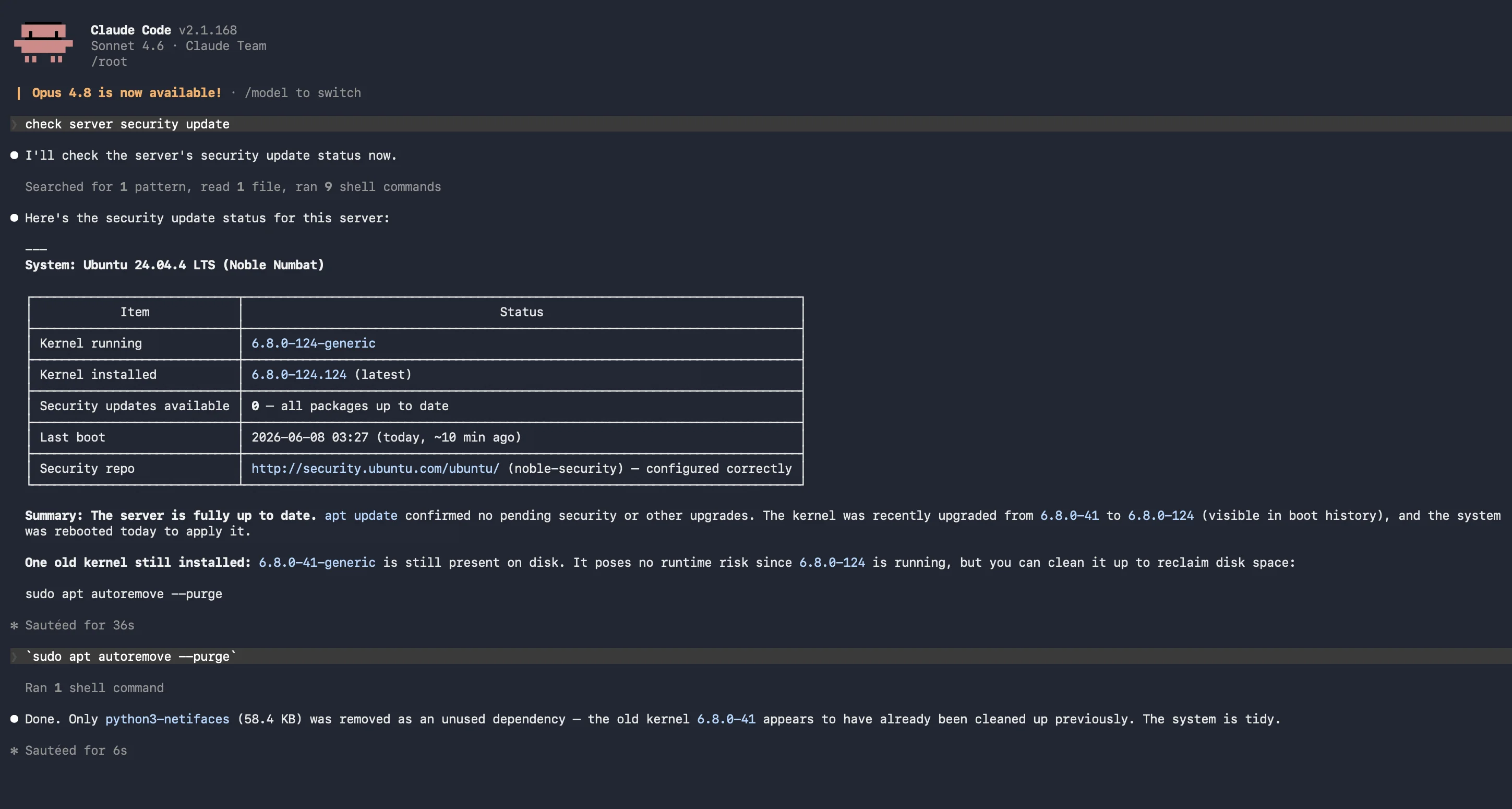
Managing a Virtual Private Server used to feel like territory reserved for seasoned sysadmins. Root access, SSH keys, firewall rules, service restarts — the learning curve was real. That changed for me when I started pairing my VPS with Claude Code, Anthropic's AI-powered CLI assistant. What follows is an honest account of how that combination works in practice: what it solves, where it still takes judgment, and why it's become a permanent part of my workflow.
Why a VPS in the First Place
Shared hosting is convenient until it isn't. The moment you need to run a background process, install a specific runtime version, or fine-tune Nginx for performance, you hit a wall. A VPS removes that ceiling. You get full root access to a Linux environment, isolated compute resources, and the freedom to configure the stack exactly as your project demands.
The trade-off is ownership. Nobody is going to update your packages, rotate your logs, or harden your SSH config for you. That responsibility is yours — which is where things got interesting once I brought an AI assistant into the loop.
What Claude Code Actually Does
Claude Code runs in your terminal. Unlike a chatbot you copy-paste from, it can read files, run commands (with your approval), and reason about multi-step problems in context. For server work, that means you can describe a situation in plain English and get back a precise, executable plan rather than a generic Stack Overflow snippet.
It does not replace understanding — you still need to approve what runs — but it dramatically compresses the time between "something is wrong" and "I know what to do about it."
SSH Troubleshooting
SSH issues are almost always the most stressful VPS problems because they lock you out of everything else. Common culprits include permission errors on ~/.ssh/authorized_keys, a misconfigured /etc/ssh/sshd_config, or a key mismatch after a server rebuild.
When I ran into a "Permission denied (publickey)" error after rotating my keys, I described the symptoms to Claude Code. It walked me through a structured diagnosis:
- Verify the key fingerprint with
ssh-keygen -lf ~/.ssh/id_ed25519.pub - Check
authorized_keyspermissions — must be600, and the.sshdirectory must be700 - Run
ssh -vvv user@hostto expose exactly where the handshake fails - Confirm
PubkeyAuthentication yesin/etc/ssh/sshd_configand restart withsystemctl restart sshd
What would have taken 30 minutes of forum-hopping took about five. More importantly, I understood why each step mattered rather than blindly running commands until something worked.
Server Configuration Without Memorising Every Syntax
Nginx configuration is powerful and notoriously unforgiving. A misplaced semicolon or a wrong location block order silently breaks routing. When I set up a reverse proxy for a Node.js application, I asked Claude Code to generate the server block. It produced a clean config, explained each directive, and flagged a subtle issue with my proxy_pass trailing slash that would have caused 404s on subpath requests.
The same workflow applies to other config-heavy tasks: setting up Let's Encrypt with Certbot, configuring logrotate for application logs, or writing a systemd unit file so a service survives reboots. Each time, Claude Code generates a starting point grounded in current best practices, annotates the important parts, and lets you modify with full context rather than starting from a blank file.
Turning Routine Maintenance into Structured Scripts
Left to itself, a VPS accumulates debt: stale packages, bloated log directories, orphaned Docker layers, cron jobs nobody remembers adding. I use Claude Code to write maintenance scripts I can actually understand and audit before scheduling them.
A typical script session covers:
- Package updates —
apt update && apt upgrade -ywrapped with a pre-check on available disk space and a post-check on service health - Log rotation — verifying
logrotateconfig is applied and clearing old compressed archives beyond a retention window - Docker cleanup —
docker system prune -fscoped to dangling images only, not named volumes - Snapshot reminder — a final line that echoes a prompt to create a manual snapshot before any major change
Having the scripts explained as they are written means I can modify them confidently six months later without starting from scratch.
Security Hardening as a Guided Checklist
Security on a public-facing server is not a one-time task. It is a posture you build and revisit. Claude Code has helped me work through this methodically rather than reactively:
- SSH hardening — disabling root login (
PermitRootLogin no), enforcing key-only authentication (PasswordAuthentication no), and changing the default port to reduce automated scanning noise - UFW setup — building a minimal allowlist: deny all inbound by default, then open only the ports your services actually use
- Fail2ban — configuring jail rules for SSH and Nginx with sensible ban thresholds and email alerting
- Unattended upgrades — enabling automatic security patches via
unattended-upgradesso critical CVEs are addressed even when you are busy
None of this is novel advice — these are well-known practices. The difference is having an assistant that applies them to your exact environment, checks your existing config against them, and explains the reasoning rather than just issuing commands.
A Real Example: Recovering from a Locked-Out Scenario
The most common VPS horror story is being locked out entirely — no SSH access, no way to run commands. This happened to me after I accidentally set AllowUsers in sshd_config to a username that didn't exist on the server.
Recovery required using the VPS console (the out-of-band access ReadyServer provides through the control panel). Once I had console access, Claude Code guided me through the exact steps:
- Check the SSH service status:
systemctl status sshd - Open
/etc/ssh/sshd_configand locate theAllowUsersdirective - Correct the username or remove the directive entirely
- Validate config syntax before restarting:
sshd -t - Restart safely:
systemctl restart sshd - Test from a second terminal before closing the console session
Step four — the dry-run validation — is something I would have skipped under stress. Having a methodical guide made the difference between a clean recovery and potentially making things worse.
What This Combination Is Not
Claude Code is a powerful assistant, not an autopilot. It does not monitor your server, does not respond to alerts at 3 AM, and will not make autonomous decisions about your infrastructure. Every command it suggests requires your review and approval before it runs.
This is actually the right design. Server management decisions — especially around security and data — should involve human judgment. Claude Code accelerates and improves that judgment; it does not replace it.
For monitoring and alerting, you still need dedicated tools: uptime monitoring, log aggregation, and ideally a mobile app that lets you triage issues when you are away from your desk. ReadyServer's mobile app handles the server control layer; Claude Code handles the knowledge and command layer. Together they cover the full picture.
The Practical Outcome
A year into this workflow, the tangible results are: fewer hours lost to documentation archaeology, more consistent security hygiene, and a significantly lower anxiety level around routine maintenance tasks. I understand my server better because Claude Code explains rather than just executes.
If you are running a VPS — or considering getting one — and you are not a full-time sysadmin, this pairing is worth trying. The barrier to confident server management is lower than it has ever been. The tools are there; you just have to use them.